
One of the common and dangerous defects during penetration testing is the Unrestricted File Upload. It refers to the application accepting file types other than the intended ones. For example, if the function accepts application forms or CVs in PDF format, it should not accept files other than PDF. At a surface level, the user might have overlooked and be sending his/her CV in .doc or .docx with legitimate CV content. A more sinister level would be a threat actor uploading malicious files that can either delete or infect the server or gain persistence through backdoors.
One quick action developers can take is to validate the uploaded file’s extension. This is a good starting point, but it is deficient. Threat actors can rename their files to an acceptable file extension, even if the actual file type is different, and the application accepts it.
Here is an example of an application that rejects the file because of an unacceptable file extension:

However, it does not change the fact that the renamed file cannot be more harmful, since it can no longer execute due to its incorrect file type.
So what threat actors do is to tamper or modify the MIME type (Multipurpose Internet Mail Extensions). Since the application knows that what you uploaded is an executable file, the MIME type will be set accordingly. But using a proxy tool, you can attempt to intercept the HTTP request and modify it as an innocuous and acceptable file type like a PDF. Here are some of the MIME types (not exhaustive):
| File Type | MIME Type |
|---|---|
| JPG Image | image/jpeg |
| PNG Image | image/png |
| PDF Document | application/pdf |
| Word Document | application/vnd.openxmlformats-officedocument.wordprocessingml.document |
| ZIP File | application/zip |
If the threat actor successfully uploads an executable or script file by modifying the MIME type, the application administrator may mistakenly believe the file is legitimate and accidentally trigger the malicious file.
Here are the steps:
- Create a simple script that will trigger when opened. We created a sample benign Reflected XSS script.

- The script is then attempted to be uploaded in the File Upload function of the app.
- Submit the upload but Intercept the request using a Proxy Tool. In this case, we used Burp Suite to check the HTTP Request.

- We modify the Content-Type to img/png.

- Submit the file upload and see if it is successful.

- Check the directory where the script is uploaded.

- Try to open the script to see if it is running.


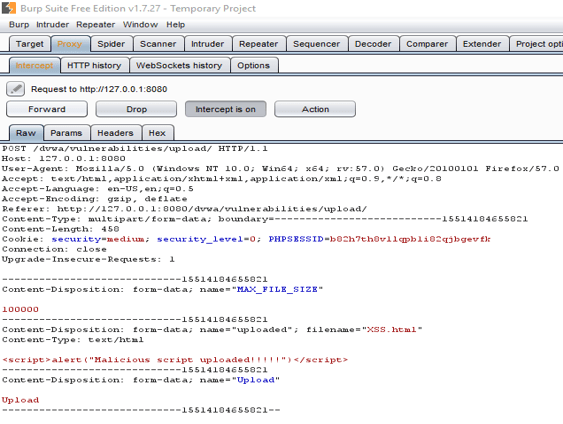


So what now? What do we recommend then?
The application must validate based on File Signature Validation (Magic Numbers). This is an important aspect of integrity, since all file types have a distinct signature.
For example, JPG has a file signature of FF D8 FF, while PNG has a file signature of 89 50 4E 47 0D 0A 1A 0A. A list of magic numbers can be found here: https://en.wikipedia.org/wiki/List_of_file_signatures
The point is that the application should ensure that the uploaded files are indeed the ones we expect. The file signature is really useful for determining the file type, whereas easily modified aspects are less useful.
There are other layers of validation to check, such as maximum file size and malware scanning. But at the bare minimum, a file signature check must be at the top of the list.